
Microsoft Office 365 problem for the group

Steps:

1. Launch Excel

2. Click "Options -> General"

3. Inside 'User Interface options - When using multiple displays" select "Optimize for compatibility"
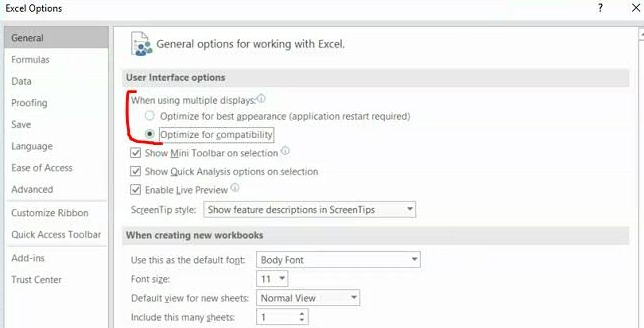
Excel Multiple Displays Options


4. Close Excel

5. Re-launch Controller and test.

No idea if this works … just what Google told me to do.
I did this as soon as I got to the office today at 7am. Decided to restart the computer instead of just restarting Microsoft programs and so far 3 hours almost and everything still looks as it should.

Thank you for this!
 
Steps:

1. Launch Excel

2. Click "Options -> General"

3. Inside 'User Interface options - When using multiple displays" select "Optimize for compatibility"

Excel Multiple Displays Options


4. Close Excel

5. Re-launch Controller and test.

No idea if this works … just what Google told me to do.
So update to my last post. Everything worked just as they should until I stepped away from my computer to have a meeting and laptop went to sleep. When I came back and woke it up it reverted to the same thing again. Frustrating
 
I’m assuming you regularly check for Office updates.

Do you have any Add-ins? Try disabling those?

Otherwise, my guess would be a corrupt profile.
Went into Office updates and it was set on "Automatic". I searched for an update which it did and it all acted fine until computer went to sleep because of inactivity for a while. Did the same stuff once I woke it up
 
Went into Office updates and it was set on "Automatic". I searched for an update which it did and it all acted fine until computer went to sleep because of inactivity for a while. Did the same stuff once I woke it up

Is this only happening on your computer waking from sleep?

Try a repair of the Office Install?

 
Steps:

1. Launch Excel

2. Click "Options -> General"

3. Inside 'User Interface options - When using multiple displays" select "Optimize for compatibility"

Excel Multiple Displays Options


4. Close Excel

5. Re-launch Controller and test.

No idea if this works … just what Google told me to do.
Hilarious that this isn't 100% controlled by the O.S.
 
Don't let it go to sleep then.

Open a browser, pull up youtube and just let music play in the background (you can mute it) and your computer won't go to sleep
There's also a simple script which will keep it awake. But, REALLY sad that Windows isn't doing its job. I'm probably a broken record by now, but am so frickin glad I switched to Linux this past spring. Ironically, I use multiple browsers for multiple reasons. And the ONLY browser which has issues is "Edge". Not to mention since they went to the Chrome engine, is the most bloated of all browsers by 50% and is the one being updated the most. Tell you anything?
 
  • Like
Reactions: isufbcurt
There's also a simple script which will keep it awake. But, REALLY sad that Windows isn't doing its job. I'm probably a broken record by now, but am so frickin glad I switched to Linux this past spring. Ironically, I use multiple browsers for multiple reasons. And the ONLY browser which has issues is "Edge". Not to mention since they went to the Chrome engine, is the most bloated of all browsers by 50% and is the one being updated the most. Tell you anything?
You must have searched for years to find a reason to use Edge.
 
  • Haha
Reactions: Cloneon